
Vina Scoring Functions: Vina vs Vinardo vs AD4 (–scoring)
AutoDock Vina 1.2 ships three scoring functions behind one flag: --scoring vina (the default), --scoring vinardo and --scoring ad4. Vina and Vinardo read a receptor PDBQT and compute their own grids. AD4 needs precomputed AutoGrid4 affinity maps passed with --maps. Scores from different functions are not comparable, so choose one by redocking a known ligand, then report it.
Most students run vina with the defaults and never learn that the scoring function is a choice. It is a real one, and a reviewer can ask why you made it. This guide from the StemSkills Lab team (10+ years in structural bioinformatics, drug design and molecular modeling) shows what each option is, the exact commands, how to test them on your own target, and the sentence to put in your methods section. If you are new to docking, start with our molecular docking learning path and come back here once you have run a first job.
What are the three scoring functions in AutoDock Vina 1.2?
A scoring function is the equation that turns a ligand pose into a number. The search algorithm moves the ligand around the box; the scoring function decides which poses are good. Vina 1.2 lets you swap that equation without changing anything else.
- Vina is the original empirical function from Trott and Olson, Journal of Computational Chemistry 31(2):455-461, 2010. It combines steric terms (two Gaussians and a repulsion term), a hydrophobic term, a hydrogen-bond term and a penalty for rotatable bonds. It has no explicit electrostatics.
- Vinardo (“Vina RaDii Optimized”) is a reparameterised Vina from Quiroga and Villarreal, PLoS ONE 11(5):e0155183, 2016. It keeps the Vina form but changes the atomic radii, drops the second Gaussian and uses new weights.
- AD4 is the AutoDock 4.2 semi-empirical free-energy force field (Huey et al., Journal of Computational Chemistry 28(6):1145-1152, 2007), with van der Waals, hydrogen-bond, electrostatic and desolvation terms. It reads energies from AutoGrid4 maps.
Vinardo and AD4 became native options in AutoDock Vina 1.2.0 (Eberhardt, Santos-Martins, Tillack and Forli, Journal of Chemical Information and Modeling 61(8):3891-3898, 2021). Before 1.2, students usually ran Vinardo through the Smina fork, where the original paper released it. In the Vina source, the flag is documented exactly as “scoring function (ad4, vina or vinardo)”, with vina as the default.
How is Vinardo different from the default Vina scoring function?
Both functions share the same mathematical skeleton, so the cleanest comparison is the weights the program actually uses. These are the default values in the Vina 1.2 source code (src/main/main.cpp on the official GitHub repository), which you can also print with vina --help_advanced:
| Term | Vina weight | Vinardo weight |
|---|---|---|
| gauss1 (steric attraction) | -0.035579 | -0.045 |
| gauss2 (wider steric attraction) | -0.005156 | not used |
| repulsion | 0.840245 | 0.8 |
| hydrophobic | -0.035069 | -0.035 |
| hydrogen bond | -0.587439 | -0.600 |
| rotatable bond penalty (N_rot) | 0.05846 | 0.05846 |
The weights alone understate the change, because Vinardo also uses different atomic radii, which shifts where each term switches on. The Vinardo authors trained it on redocking performance rather than only on correlation with experimental affinities. Their abstract states: “Vinardo outperforms Vina in all tests performed, for all datasets analyzed.” Treat that as the authors’ benchmark on their datasets, not a guarantee for your protein. That is exactly why the redocking test later in this guide matters.
What is the exact command for each scoring function?
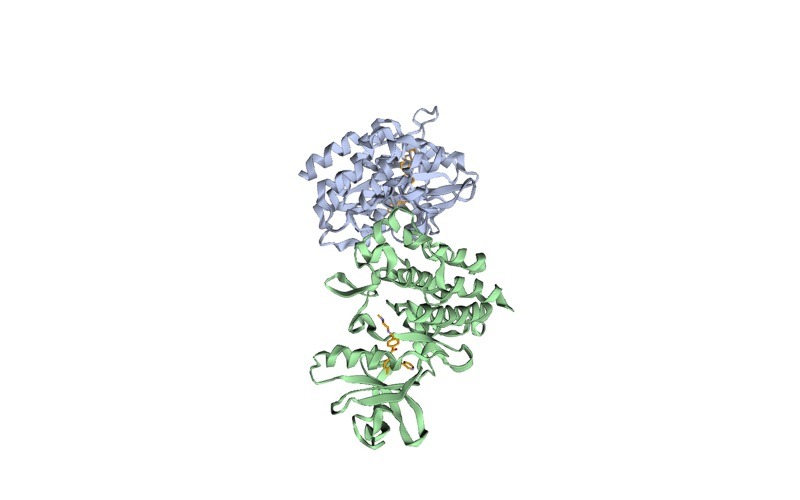
The examples below follow the official AutoDock Vina basic docking tutorial, which docks imatinib into the Abl kinase domain from PDB entry 1IEP. File preparation uses Meeko; if you have not prepared PDBQT files before, see our Meeko preparation guide.
Vina (default)
Put the box in a config file (1iep_receptor.box.txt) with center_x, center_y, center_z and size_x, size_y, size_z in Angstrom, then run:
vina --receptor 1iep_receptor.pdbqt --ligand 1iep_ligand.pdbqt \
     --config 1iep_receptor.box.txt \
     --exhaustiveness 32 --out 1iep_ligand_vina_out.pdbqt
Leaving out --scoring is the same as writing --scoring vina.
Vinardo
Same inputs, one extra flag:
vina --receptor 1iep_receptor.pdbqt --ligand 1iep_ligand.pdbqt \
     --config 1iep_receptor.box.txt --scoring vinardo \
     --exhaustiveness 32 --out 1iep_ligand_vinardo_out.pdbqt
The log header changes to Scoring function : vinardo and Vina reports “Computing Vinardo grid” instead of “Computing Vina grid”. Check that line every time; it is your proof of which function ran.
AD4
AD4 cannot read a receptor PDBQT directly. You first write a grid parameter file (GPF) and run AutoGrid4 to make one affinity map per ligand atom type, plus electrostatic and desolvation maps. Meeko writes the GPF when you add -g:
mk_prepare_receptor.py -i 1iep_receptorH.pdb -o 1iep_receptor -p -v -g \
    --box_size 20 20 20 --box_center 15.190 53.903 16.917
autogrid4 -p 1iep_receptor.gpf -l 1iep_receptor.glg
This produces 1iep_receptor.maps.fld, one 1iep_receptor.<type>.map per atom type (A, C, HD, H, NA, N, OA for this ligand), 1iep_receptor.e.map and 1iep_receptor.d.map. Then pass the map prefix, not a receptor:
vina --ligand 1iep_ligand.pdbqt --maps 1iep_receptor --scoring ad4 \
     --exhaustiveness 32 --out 1iep_ligand_ad4_out.pdbqt
The box comes from the maps, so no --config box is needed. AD4 is the only one of the three with an electrostatic term, so the partial charges in your PDBQT files now affect the score. Vina and Vinardo ignore them.
Want the guided, hands-on version?
Our live Molecular Modeling & MD Simulations cohort bootcamp takes you from zero to running real docking and MD workflows, with a portfolio project for your grad-school applications.
Can I compare scores from Vina, Vinardo and AD4?
No. All three print “kcal/mol”, but each is a different empirical model with different terms and weights. The official tutorial warns that AutoDock and Vina force field scores are “not comparable between each other.” On the 1IEP example, the documented best pose scores about -14.72 kcal/mol with AD4 and -13.23 kcal/mol with Vina at exhaustiveness 32. Both describe a pose close to the crystal structure; the 1.5 unit gap says nothing about which function is “stronger”.
The practical rules:
- Rank ligands only against other ligands scored with the same function, same receptor and same box.
- Never mix functions inside one results table, and never say a compound “binds better under Vinardo”.
- A score is a ranking signal, not a measured binding free energy. Our guide on how to interpret molecular docking results covers what the number can and cannot support.
How do I compare the three scoring functions on a redocking test?
Redocking means docking the co-crystallised ligand back into its own receptor and measuring how close the top pose lands to the crystal pose. A top-ranked pose within 2.0 Angstrom RMSD of the crystal pose is the conventional success threshold in docking papers. Run it once per scoring function on your target before you screen anything.
- Pick a holo structure of your target with a drug-like ligand. Keep the crystal ligand as an SDF; this is your reference.
- Prepare once, dock three times. Use the same receptor, the same box and a fixed seed so only the scoring function changes:
for sf in vina vinardo; do vina --receptor rec.pdbqt --ligand lig.pdbqt --config box.txt \ --scoring $sf --exhaustiveness 32 --seed 42 --out redock_$sf.pdbqt done vina --ligand lig.pdbqt --maps rec --scoring ad4 \ --exhaustiveness 32 --seed 42 --out redock_ad4.pdbqt - Convert poses to SDF with Meeko, which keeps the original bond orders:
mk_export.py redock_vina.pdbqt -s redock_vina.sdf(repeat for each file). - Compute heavy-atom RMSD of each pose against the crystal ligand. Open Babel’s
obrmsdoes this (obrms crystal.sdf redock_vina.sdf); strip hydrogens first withobabel in.sdf -O out_noH.sdf -dif your files differ in protonation. - Record two numbers per function: RMSD of the top-ranked pose, and the rank of the best pose under 2.0 Angstrom. A function that finds the right pose but ranks it fifth is weaker than one that ranks it first.
- Optional rescoring check. Score the crystal pose itself without searching:
vina --receptor rec.pdbqt --ligand crystal_lig.pdbqt --config box.txt --scoring vinardo --score_only. Use--local_onlyinstead to minimise it in place first.
If you have more than one holo structure or known active, repeat the test on each. One redock is a sanity check; three to five is evidence. For why the same run can give different poses, read our post on exhaustiveness and reproducible docking.
Which scoring function should a student choose?
| Option | Flag | Receptor input | Extra steps | Uses charges? | Good fit |
|---|---|---|---|---|---|
| Vina | --scoring vina (default) | --receptor PDBQT | None | No | First projects, comparison with the large body of published Vina work |
| Vinardo | --scoring vinardo | --receptor PDBQT | None | No | When Vina fails your redocking test, or as a second opinion in consensus scoring |
| AD4 | --scoring ad4 | --maps prefix only | GPF + autogrid4 | Yes | Charged or polar pockets, AutoDock4 workflows such as hydrated docking, matching older AD4 studies |
A sensible default for a thesis project: start with Vina, run the redocking test with Vina and Vinardo, and keep whichever reproduces the crystal pose better on your target. Reach for AD4 when electrostatics clearly drive binding or when you must match an AutoDock4 protocol from a paper you are extending. For a broader comparison of the two programs (not only the scoring), see AutoDock Vina vs AutoDock4. If you want a learned rescoring layer on top, our GNINA tutorial adds CNN scoring after Vina.
Speed is rarely the deciding factor. Trott and Olson reported “approximately two orders of magnitude speed-up” for Vina over AutoDock 4, but that compared whole programs. Inside Vina 1.2 all three functions use the same search; the main extra cost of AD4 is the one-time AutoGrid4 step.
How do I report the scoring function in a methods section?
Name the program version, the scoring function with its citation, and the search settings. Get the version from vina --version. A template:
Docking was performed with AutoDock Vina [version] (Eberhardt et al., 2021) using the Vinardo scoring function (Quiroga and Villarreal, 2016;
--scoring vinardo). The search box was centred at (x, y, z) with dimensions of a by b by c Angstrom, exhaustiveness was 32 and the random seed was fixed at 42. The scoring function was selected after redocking the co-crystallised ligand of PDB [ID], which Vinardo reproduced within [value] Angstrom RMSD.
For AD4, also state that maps were generated with AutoGrid4 and how the GPF was written. Our full guide on writing the methods section of a docking study covers the rest of the paragraph.
What errors come up when switching scoring functions, and how do I fix them?
These messages are taken from the Vina 1.2 source code, so you will see them word for word:
Scoring function Vinardo unknown.The value is case-sensitive. Use lowercasevina,vinardoorad4.ERROR: No receptor allowed, only --flex argument with the AD4 scoring function.You passed--receptorwith--scoring ad4. Remove it and pass--maps <prefix>. Flexible side chains can still go in--flex.ERROR: Affinity maps are missing.You chose AD4 without--maps. Runautogrid4first and give the prefix (for example1iep_receptor, not1iep_receptor.maps.fld).ERROR: Affinity map for atom type Cl is not present.(or Br, F, S and so on). Your GPF did not list that ligand atom type, so AutoGrid4 never wrote its map. Regenerate the GPF so it includes every ligand atom type you plan to dock, then rerunautogrid4.ERROR: Electrostatic map is not present.orERROR: Desolvation map is not present.The.e.mapor.d.mapfile is missing or misnamed. Check the.glglog for an AutoGrid4 failure.ERROR: Cannot specify both receptor and affinity maps at the same time. Pick one input route:--receptorfor Vina or Vinardo,--mapsfor AD4.
For problems that are not specific to scoring, see the 10 AutoDock Vina errors that stop beginners. To see where scoring-function choice sits among the other skills you need, the computational biology skills roadmap lays out the order.
Frequently asked questions
Is Vinardo better than Vina?
On the datasets in the original Vinardo paper it performed better in scoring, docking and virtual screening. On a specific protein it may or may not. Run a redocking test on your own target and keep the function that reproduces the crystal pose.
Do I need AutoDockTools to use the AD4 scoring function in Vina?
No. Meeko’s mk_prepare_receptor.py with -g writes the grid parameter file, and autogrid4 builds the maps. You still need the AutoGrid4 program installed, because Vina does not compute AD4 maps itself.
Can I use Vinardo from the Vina Python bindings?
Yes. Create the docking object with Vina(sf_name='vinardo'). The sf_name argument accepts the same three values as the command-line flag, as described in the AutoDock Vina documentation.
Why is my AD4 score more negative than my Vina score for the same ligand?
Because the two functions are different models. The official tutorial warns that their scores are not comparable, and its own 1IEP example gives about -14.72 kcal/mol with AD4 against -13.23 kcal/mol with Vina.
Can I change the weights of a scoring function?
Yes, through advanced flags such as --weight_vinardo_hydrogen or --weight_ad4_elec, listed by vina --help_advanced. Changing them creates a new, unvalidated function, so do it only for method development and report every changed value.
Which scoring function do most published studies use?
Most Vina studies keep the default Vina function, because it is the default and has been available since 2010. That makes it the easiest to compare with prior work, which is a valid reason to keep it if it passes your redocking test.
Want the guided, hands-on version?
Our live Molecular Modeling & MD Simulations cohort bootcamp takes you from zero to running real docking and MD workflows, with a portfolio project for your grad-school applications.