
How to Prepare a Protein and Ligand for Molecular Docking (Step-by-Step Beginner’s Guide)
Most failed docking runs do not fail at the docking step. They fail earlier, in file preparation, and the program never warns you. A protein straight from the database and a ligand drawn in 2D will both load without error and still produce numbers that mean nothing. Getting preparation right is what separates a result you can trust from a result you only think you can trust.
Preparing a protein and ligand for docking means turning raw structure files into clean, docking-ready PDBQT files. For the protein, you remove water and unwanted heteroatoms, add hydrogens, and assign partial charges. For the ligand, you generate proper 3D coordinates, add hydrogens, assign charges, and define which bonds can rotate. Both molecules are then saved in the PDBQT format that AutoDock Vina reads.
This guide walks through every preparation step in order, explains why each one matters, and points you to the tools that do the work. It is the step that comes right before you run a job, so it pairs directly with our AutoDock Vina tutorial for beginners and sits inside our pillar guide on how to learn molecular docking, a key stop on the computational biology skills roadmap.
Why can’t I just dock the raw PDB and ligand files?
Because docking software needs information that ordinary structure files do not contain. A crystal structure from the Protein Data Bank is a snapshot built to describe an experiment, not to run a simulation. It usually omits hydrogen atoms (X-ray crystallography rarely resolves them), carries crystallisation artefacts like water molecules and buffer ions, and says nothing about partial charges.
AutoDock Vina reads a special format called PDBQT. It is a standard PDB file with two extra pieces of information added to every atom: a partial charge (the “Q”) and an AutoDock atom type (the “T”). Preparation is simply the process of supplying everything the raw file is missing, hydrogens, charges, atom types, and a sensible set of rotatable bonds, and writing it out in this format. The canonical reference for the whole workflow is the AutoDock suite protocol by Stefano Forli and colleagues, “Computational protein-ligand docking and virtual drug screening with the AutoDock suite” (Nature Protocols, 11(5):905-919, 2016), which most university courses still teach from today.
Where do I get the protein and ligand structures?
You need two starting files: a 3D structure of your protein (the receptor) and a structure of your small molecule (the ligand).
- Protein: download it from the RCSB Protein Data Bank using its four-character PDB ID (for example,
1HSG). Choose an experimental structure with good resolution where you can, a lower resolution number in Angstroms means a more reliable model. - Ligand: get it from a chemical database such as PubChem (download the 3D SDF), or extract a co-crystallised ligand that is already sitting in your protein’s PDB file. Starting from a co-crystallised ligand is the easiest path for your first project, because it also tells you exactly where the binding site is.
Whenever a usable co-crystallised complex exists, prefer it. It gives you the receptor, the ligand, and a built-in positive control all in one file.
How do I prepare the protein (receptor)?
Protein preparation is a short, repeatable checklist. Work through it in order.
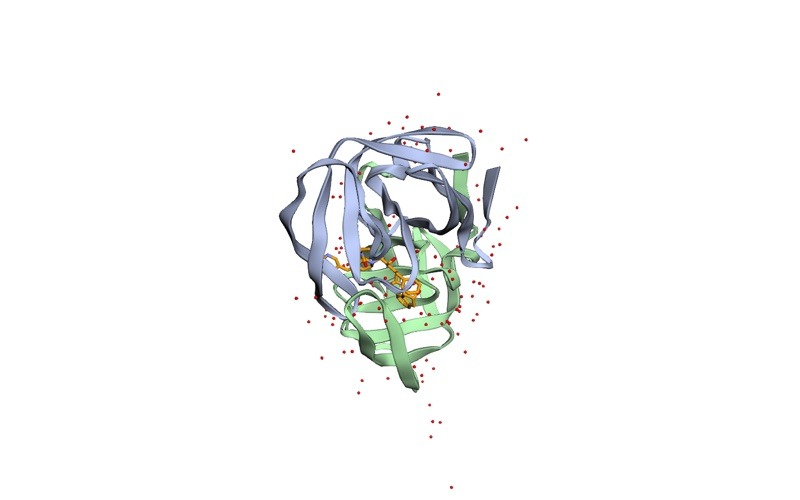
- Split off and inspect the contents. Open the PDB in a viewer like UCSF Chimera or PyMOL and see what is actually in the file: protein chains, water, ions, ligands, and sometimes more than one copy of the protein.
- Remove water and unwanted heteroatoms. Delete crystallographic water molecules and any co-crystallised molecules, ions, or buffer components you are not docking. Keep a metal ion or cofactor only if it is genuinely part of the binding mechanism.
- Fix missing atoms and residues. Crystal structures sometimes have gaps where flexible loops or side chains were not resolved. Tools such as Chimera’s Dock Prep or a modelling step can rebuild missing side-chain atoms so the pocket is complete.
- Add hydrogens. Add the hydrogen atoms the crystal structure left out. This also fixes the protonation state, whether key residues are charged at your working pH, which directly affects the binding interactions docking will score.
- Assign partial charges and convert to PDBQT. The classic AutoDockTools route adds polar hydrogens, assigns Gasteiger partial charges, merges non-polar hydrogens, and writes
receptor.pdbqt. By default the receptor is treated as rigid.
The single most common protein-prep error is leaving water in the file or forgetting hydrogens. Both pass silently and quietly corrupt every score that follows.
Want the guided, hands-on version?
Our live Molecular Modeling & MD Simulations cohort bootcamp takes you from zero to running real docking and MD workflows, with a portfolio project for your grad-school applications.
How do I prepare the ligand?
Ligand preparation has its own checklist. The goal is a chemically correct 3D molecule with the right charges and a defined set of flexible bonds.
- Get a proper 3D structure. If your ligand came from a 2D source (a SMILES string or a flat sketch), you must generate 3D coordinates first. A SMILES string has no shape, and docking a flat molecule is meaningless.
- Set the correct protonation and tautomer state. Make sure ionisable groups (such as carboxylic acids or amines) carry the charge they would have at physiological pH, and pick the dominant tautomer. This is easy to overlook and can change the result entirely.
- Add hydrogens and assign charges. As with the protein, add hydrogens and assign Gasteiger partial charges.
- Define rotatable bonds (torsions). These are the bonds Vina is allowed to rotate as it searches for a fit. Preparation tools detect them automatically; the ligand’s flexibility is what makes docking a search problem rather than a single calculation.
- Save as PDBQT. Export the finished ligand as
ligand.pdbqt, ready to dock.
For AutoDock Vina 1.2, the developers now recommend the Meeko toolkit for ligand preparation, introduced alongside the release described by Jerome Eberhardt and colleagues in “AutoDock Vina 1.2.0: New Docking Methods, Expanded Force Field, and Python Bindings” (Journal of Chemical Information and Modeling, 61(8):3891-3898, 2021). The older AutoDockTools prepare_ligand script still works and is widely taught.
Which tools should I use to prepare files?
Several free tools do the job, and most workflows mix two or three. Here is how the common ones compare.
| Tool | Main role in preparation | Best for | Output |
|---|---|---|---|
| AutoDockTools (MGLTools) | Clean, add charges, set torsions, write PDBQT for both molecules | The classic, widely taught GUI route for beginners | PDBQT |
| Meeko | Ligand preparation for Vina 1.2 (Python/command line) | Modern, scriptable ligand prep; many ligands at once | PDBQT |
| Open Babel | Format conversion, add hydrogens, generate 3D coordinates | Turning SMILES/SDF into 3D and converting formats | Many (incl. PDBQT) |
| UCSF Chimera (Dock Prep) | Clean protein, rebuild missing atoms, add hydrogens/charges | Visual, guided protein cleanup | PDB / Mol2 |
| PyMOL | Inspect structures, remove water/heteroatoms, read box coordinates | Visual checking at every stage | PDB |
A typical beginner pipeline is: clean and inspect the protein in Chimera or PyMOL, convert the ligand to 3D with Open Babel, then assign charges and write both PDBQT files with AutoDockTools or Meeko. None of these requires a paid licence for academic use.
How do I know my files are prepared correctly?
Verify before you dock, it takes two minutes and saves hours. Open each PDBQT file in a viewer and confirm three things: hydrogens are present, no stray water or unwanted heteroatoms remain, and the molecule’s geometry looks chemically sensible (no broken bonds or distorted rings).
The strongest check is a re-docking control. If you started from a co-crystallised complex, dock the native ligand back into its own protein and confirm the software reproduces the experimental pose. The accepted benchmark in the field is a root-mean-square deviation (RMSD) below 2.0 Angstrom from the crystal pose, if your prepared files reproduce the known binding mode, your preparation is sound and you can trust new predictions on the same target.
Speed matters here too. The reason Vina rewards careful, lightweight preparation is that it is built to be fast: the original method by Oleg Trott and Arthur J. Olson (Trott & Olson, 2010) reports that Vina “achieves an approximately two orders of magnitude speed-up compared with the molecular docking software previously developed in our lab (AutoDock 4), while also significantly improving the accuracy of the binding mode predictions.” Clean inputs let that speed work for you instead of against you.
What are the most common preparation mistakes?
- Leaving water or buffer molecules in the protein. Delete them unless one is mechanistically essential.
- Forgetting hydrogens or charges. A PDBQT without polar hydrogens and partial charges produces meaningless scores.
- Docking a 2D or flat ligand. Always generate real 3D coordinates first.
- Wrong protonation state. An incorrectly charged residue or ligand group changes the predicted interactions entirely.
- Skipping the re-docking control. Without a positive control, you have no way to know whether your setup actually works.
Frequently asked questions
What is the PDBQT format, and why does docking need it?
PDBQT is a PDB file extended with a partial charge (Q) and an AutoDock atom type (T) for every atom, plus a record of which bonds in the ligand can rotate. AutoDock and Vina need this extra information to score interactions and search flexible poses, which a plain PDB file cannot provide.
Do I need to add hydrogens to both the protein and the ligand?
Yes. Crystal structures usually omit hydrogens, and they are essential for correct hydrogen bonding and charge assignment. You add them to the protein during receptor prep and to the ligand during ligand prep.
Should I keep water molecules in the binding site?
For a standard beginner workflow, remove all water. A small number of structurally conserved waters can be important for some targets, but handling them correctly is an advanced topic, start by removing them and add that nuance later.
Can I prepare a ligand directly from a SMILES string?
Not directly, a SMILES string has no 3D shape. Use a tool such as Open Babel or RDKit to generate 3D coordinates and add hydrogens first, then assign charges and export PDBQT with Meeko or AutoDockTools.
How long should file preparation take?
Once you know the steps, preparing a single protein-ligand pair takes only a few minutes. The first time will be slower because you are learning each tool, which is exactly why a re-docking control is worth running before you trust any new result.
Your next step
Preparation is the habit that makes every later docking result believable. Practise it on one well-known complex, clean the protein, prepare the native ligand, write both PDBQT files, and re-dock to reproduce the crystal pose. Once that round-trip works, you can prepare any new target with confidence.
When your files are ready, move straight on to running the job in our AutoDock Vina tutorial for beginners, and use the molecular docking pillar guide and the wider computational biology skills roadmap to plan what comes after.
Want the guided, hands-on version?
Our live Molecular Modeling & MD Simulations cohort bootcamp takes you from zero to running real docking and MD workflows, with a portfolio project for your grad-school applications.
Written by the StemSkills Lab team, computational scientists with 10+ years of combined experience in sequence and structural bioinformatics, drug discovery and design, and multiscale molecular modeling.